

Discover three website accessibility problems that make it harder for customers to find information, navigate your website, and contact your business, plus practical fixes that support SEO and improve usability. Read the blog post here.
How Website Accessibility and SEO Help Businesses Attract and Keep More Customers
When small and medium sized business owners across Delaware, Pennsylvania, New Jersey, Maryland, and Northern Virginia think about digital marketing, the focus usually lands on running ads or writing blog posts. But if your website’s underlying code and layout are cluttered, slow, or difficult to navigate, you are turning away potential customers while making it harder for search engines to understand your content.
Website accessibility is also an important consideration. Depending on your organization and applicable regulations, making your website accessible to people with disabilities may be a legal obligation. But accessibility should not be viewed as just another compliance chore. When implemented correctly, it improves usability, supports technical SEO best practices, and helps ensure your digital front door is open to more potential customers. For a closer look at these responsibilities, read Advertising is Simple’s related article, Does Your Website Meet Today’s Privacy and Accessibility Expectations?
Whether it is a customer browsing your plumbing services on a smartphone, a visually impaired client using a screen reader to review your law firm’s credentials, or a search engine crawler analyzing your services, clean website design helps everyone find what they need with less friction.
Why Website Accessibility Matters for SEO and Customer Experience

Search engines like Google use website content, links, and technical signals to discover and understand web pages. AI powered search experiences, including ChatGPT, Gemini, and Claude, also use information retrieved from websites to generate responses.
Clear page organization, descriptive content, and accessible navigation make information easier for visitors to use and search systems to interpret.
When your website has broken layouts, missing text labels, or content that is difficult to access, two problems arise:
- Human visitors get frustrated and leave: If a phone number is difficult to tap, a navigation menu does not work, or a contact form breaks on a mobile screen, potential customers leave before contacting your business.
- Search engines struggle to access important information: Poorly implemented navigation, inaccessible links, and technical errors make it harder for search crawlers to discover and interpret content, limiting opportunities for visibility in traditional and AI powered search experiences.
While website accessibility compliance itself is not a direct Google ranking factor, many accessibility best practices complement effective technical SEO and improve the overall user experience.
By following recognized accessibility guidelines, including WCAG 2.1 and the newer WCAG 2.2 standards, businesses create websites that are easier to navigate, more inclusive, and better organized for visitors and search engines.
3 Website Problems That Drive Potential Customers Away
You do not need to be a software engineer to identify opportunities to improve your website. Focusing on a few core design and content standards makes a meaningful difference.
1. Confusing Website Headings Make Information Hard to Find
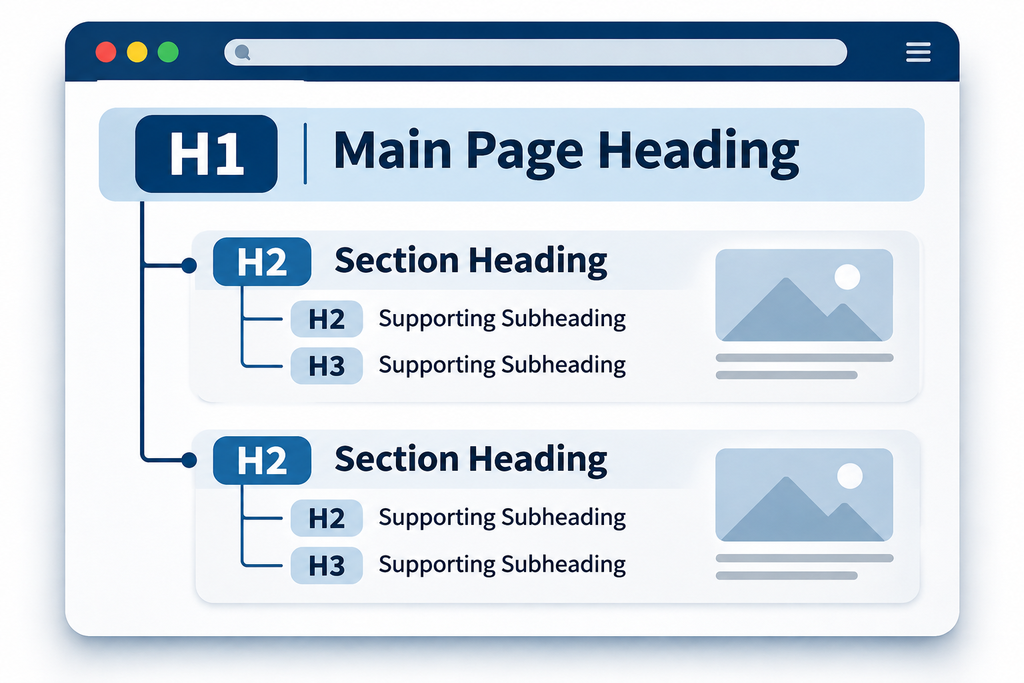
Think of your web page like a newspaper. The main headline tells readers what the page is about (H1), major sections organize key topics (H2), and specific details appear under subheadings (H3).
Why it matters: Screen readers allow visually impaired users to navigate between headings and quickly locate relevant information. Descriptive headings also help visitors and search engines understand the topics covered on a page. Although Google does not require a perfect heading hierarchy for ranking purposes, logical organization is an important accessibility and content best practice.
The fix: Replace vague headings like “Discover More” or “What We Do” with descriptive titles such as “Emergency Commercial Plumbing in Newark, DE” or “Our Family Law Services.” Make sure your headings accurately describe the content that follows.
2. Missing Image Descriptions Create Accessibility Barriers
Alt text, or alternative text, is a brief description added to an image’s HTML code to communicate its meaning or purpose.
Why it matters: Alt text helps people using screen readers understand meaningful images. It also provides search engines with additional context about the image and how it relates to the surrounding content. Although modern search engines can analyze images using advanced technologies, descriptive alt text remains valuable for both website accessibility and SEO.
The fix: Use meaningful image filenames and write concise, accurate alt text. For example, instead of uploading a photo named IMG_4092.jpg, use a descriptive filename such as custom-kitchen-remodel-wilmington-de.jpg.
Then add alt text such as “Newly remodeled kitchen with white cabinetry, a large center island, and pendant lighting in a Wilmington, Delaware home.”
Remember that filenames and alt text serve different purposes. Both should accurately describe the image without unnecessary keyword stuffing. Decorative images generally do not need descriptive alt text.
3. Poor Mobile Navigation Drives Potential Customers Away
A truly accessible website works across different devices and supports people who navigate using a keyboard, touchscreen, or assistive technology.
Why it matters: Customers increasingly research local businesses on their smartphones. If your navigation menu does not work properly on a mobile device, your text is difficult to read, or your “Request a Quote” button is too small to tap comfortably, visitors leave before taking action.
These problems reduce engagement and conversions. Google also considers certain page experience signals, including Core Web Vitals, within its ranking systems. Good usability strengthens the overall website experience and supports an effective SEO strategy.
The fix: Test your website on a smartphone and with a keyboard. Make sure buttons are easy to select, text has sufficient contrast against background colors, navigation works without a mouse, and contact forms are clearly labeled and easy to complete. Check that pages load efficiently and display correctly across different screen sizes.

Turn Website Accessibility into a Better Customer Experience
Improving website accessibility is about more than meeting technical standards. It is about removing barriers that prevent people from connecting with your business.
When you combine clean HTML structure, accessible navigation, fast mobile performance, helpful content, and clearly defined service areas, you build a stronger foundation for local SEO and a better customer experience.
For businesses serving Delaware, Pennsylvania, New Jersey, Maryland, and Northern Virginia, these improvements make it easier for potential customers to find relevant services, understand what you offer, and take the next step.
They also support a broader digital marketing strategy as search continues to evolve. AI powered search platforms are creating new ways for customers to discover businesses, making clear, accessible, and well organized website content increasingly valuable.
Accessibility alone does not guarantee better search rankings or placement in AI generated answers. However, combined with quality content and sound technical SEO, it creates a more effective website that serves both visitors and search systems.
The bottom line: Accessibility is not just about avoiding technical errors or addressing compliance concerns. It is about building a reliable, inclusive website that supports long term search visibility, customer trust, and business growth.
Learn More
- Website Accessibility Standards: W3C Web Content Accessibility Guidelines (WCAG) Overview
- Google SEO Guidance: Google Search Central SEO Starter Guide
- Google Page Experience: Understanding Page Experience in Google Search Results
- ADA Accessibility Requirements: ADA.gov Web Accessibility Guidance
- AI Search Visibility: Google Search Central: AI Features and Your Website
- Related Article: Advertising Is Simple: Does Your Website Meet Today’s Privacy and Accessibility Expectations?
Is Your Website Helping or Hurting Your Online Visibility?
Your website should make it easy for customers to find your business, explore your services, and contact you.
At Famous WSI Results, we help businesses identify opportunities to improve website accessibility, technical SEO, mobile usability, and overall search performance.
Is your website working as effectively as it should? Contact our team today at (302) 407-0430 or explore our Search Engine Optimization Services to learn how we can help strengthen your online presence.

Leave a Reply